50-day return policy⌄
- Return within 50 days of purchase.
- Full refund for unopened, sealed, unactivated items.
- Opened products may still qualify if unused.
- For orders over £100, we can arrange your return via DPD or in-person drop-off.
Next-day delivery — order before 3pm⌄
- Order before 3pm Mon–Fri for next-working-day delivery (free over £99).
- UK Saturday delivery available on orders placed before 3pm Friday.
- After 3pm Friday — dispatched Monday.
- Some UK regions may need 2–3 working days.
Discounted options with main purchase⌄
- Bundle pricing on accessories, spares and training when bought together.
- Reduced rates on add-ons selected at checkout.
- Ask us for a tailored quote on multi-unit or fleet orders.
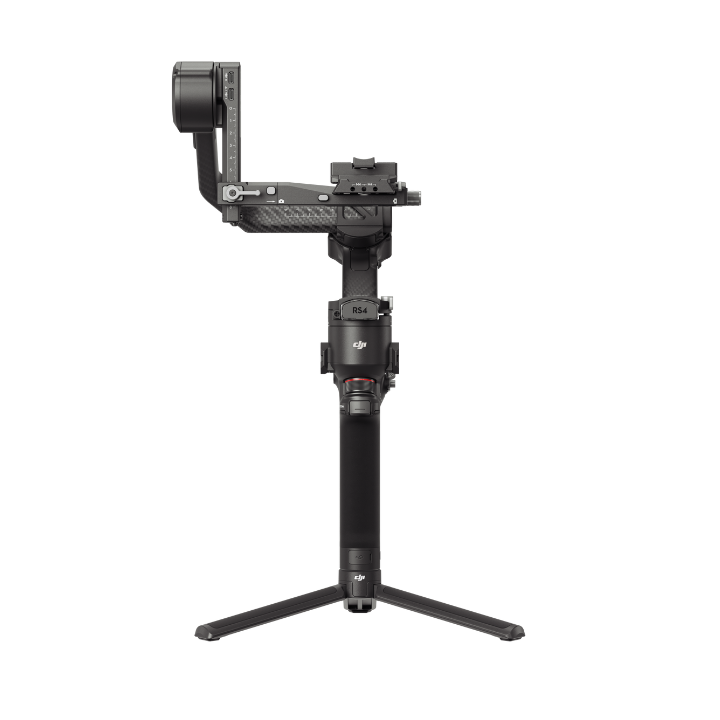
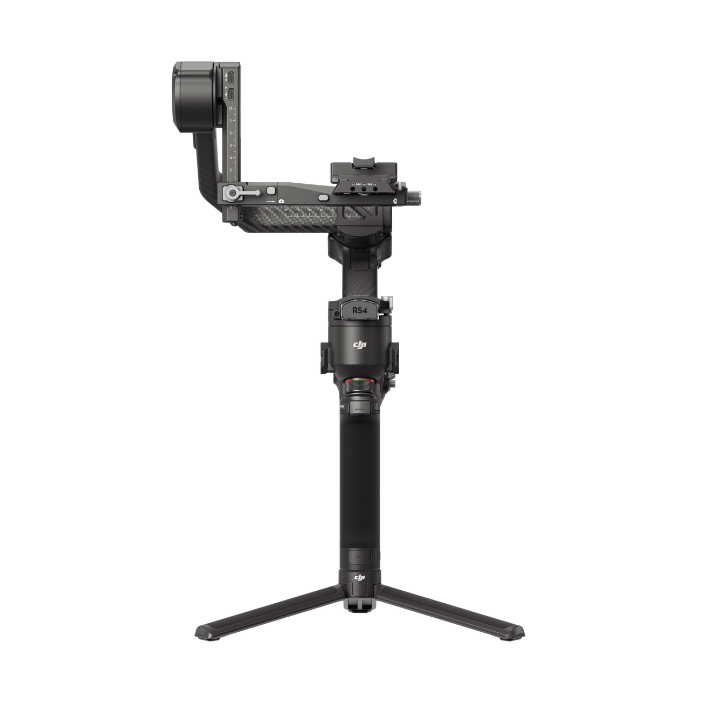
DJI RS 4 Pro Combo
A lightweight commercial stabiliser designed for professional content creation, ideal for film and television production.
Product dossier
Powerful Performance
DJI Focus Pro Creator Combo
- Large Payload Capacity:
The DJI RS 4 Pro is equipped with carbon fibre axis arms, a 4.5kg (10 lbs) payload capacity, and robust power and torque. It accommodates mainstream mirrorless/cinema camera and lens setups.
- 2nd-Gen Native Vertical Shooting:
Designed with an all-new horizontal plate, RS 4 Pro enables the second generation of native vertical shooting for further elevated efficiency. It can be easily switched to vertical shooting without requiring additional accessories.
- Smooth Balancing:
A Teflon™ coating on all three axes reduces friction and achieves smoother, more precise balancing. The upper quick-release plate has an adjustable placement guide to prevent the camera from loosening or shifting.
- Automatic Screen Lock:
The OLED touchscreen incorporates a new auto-lock feature. Once locked, the screen will display the current gimbal and joystick modes at a low brightness, reducing power consumption.
- 2nd-Gen Automated Axis Locks:
DJI RS 4 Pro can quickly start working or enter sleep mode, significantly enhancing shooting, transition, and storage efficiency. The upgraded axis locks reduce gimbal shakes.
Full specifications
Frequently asked questions
How do I enable Car Mount mode on DJI RS 4 Pro?⌄
Enable Car Mount by tapping the Auto-Tune icon on the touchscreen home page and enable Car Mount mode.* Then, tap Start Calibration to perform calibration for better stabilisation.
How do I activate DJI RS 4 Pro? ⌄
Follow the steps below to activate the device:
1: Press the power button to power on the DJI RS 4 Pro.
2: Enable Bluetooth on your mobile device.
3: Launch the DJI Ronin app and register or log in with your DJI account.
4: Select DJI RS 4 Pro on the device list, enter the default password: 12345678, and follow the on-screen instructions to activate DJI RS 4 Pro.
5: After successful activation, the DJI RS 4 Pro will enter sleep mode. Press the power button once to exit sleep mode before use.
What are the differences between DJI RS 4 Pro and DJI RS 3 Pro? ⌄
DJI RS 4 Pro supports second-generation native vertical shooting, allowing you to seamlessly switch between horizontal and vertical shooting without needing additional accessories; it also introduces a new joystick mode switch, enabling quick switching of the joystick mode to zoom control.
Additionally, the roll axis has added dual rolling bearings for smoother and easier adjustments.
The second-generation automated axis locks can achieve smaller gaps when locked, further reducing gimbal shakes.
Common questions
- Are the battery grips of DJI RS 4 Pro, DJI RS 4, and DJI RS 3 Pro interchangeable?
- DJI RS 5 vs DJI RS 4 Pro vs DJI RS 4 vs DJI RS 4 Mini: What's the difference?
- Is DJI RS 4 Pro waterproof?
- What accessories can be used interchangeably among DJI RS 4 Pro, DJI RS 4, DJI RS 3 Pro, DJI RS 3, and DJI RS 2?
- Are the battery grips of DJI RS 4, DJI RS 4 Pro, and DJI RS 3 interchangeable?
- What are the differences between DJI RS 4 Pro and DJI RS 3 Pro?